Apple Return Policy 2026: The Ultimate Guide to Refunds and Exchanges
Navigating the Apple Return Policy 2026
Buying a premium piece of technology is an investment, and occasionally, that investment doesn’t pan out exactly as planned. You might purchase a new MacBook Pro only to realize you actually needed a lighter MacBook Air. Or perhaps you gifted someone an iPhone, but they prefer a different color.
Apple offers a consumer-friendly return policy designed to give buyers peace of mind. However, the company maintains strict deadlines and specific condition requirements that you must follow to receive a full refund. Failing to understand these rules can result in a denied return or delayed processing times.
How Long Is the Apple Return Window? (14-Day Rule)
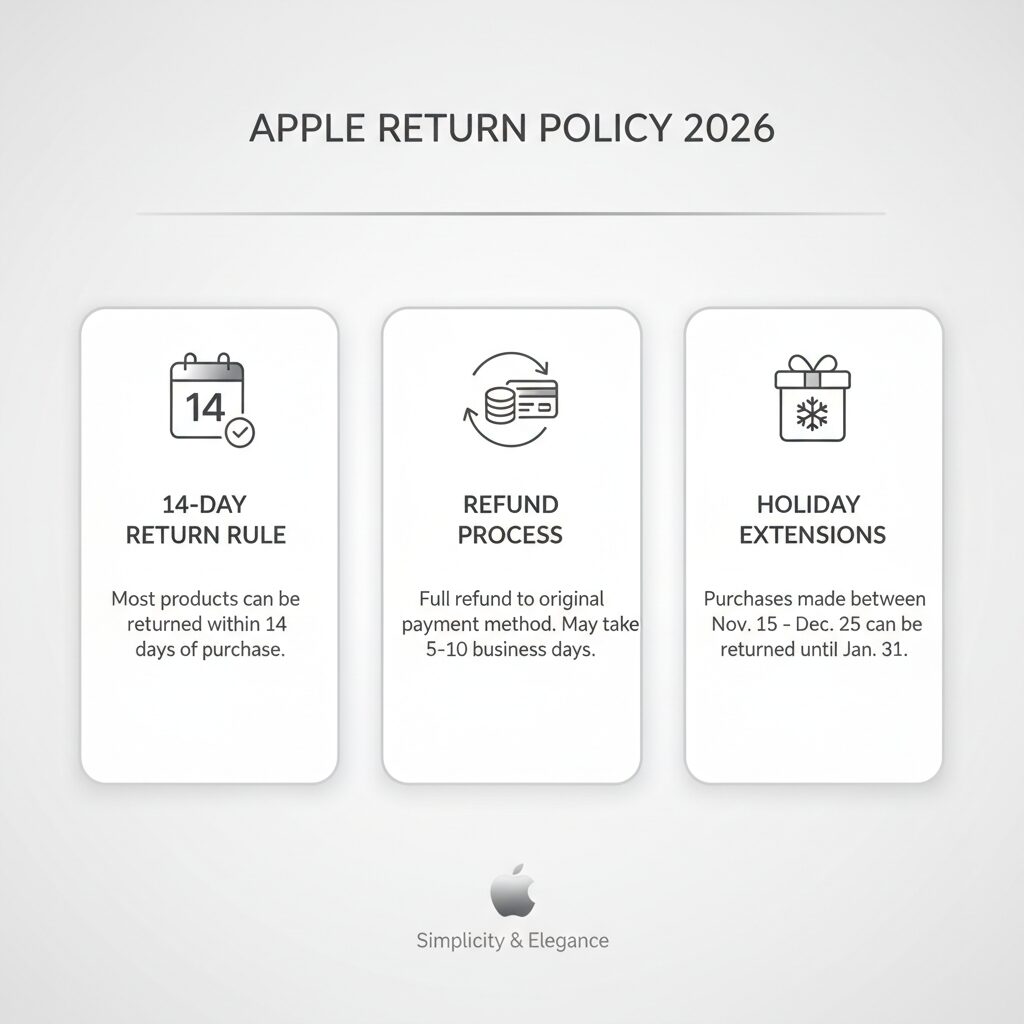
Apple’s standard return policy offers a strictly enforced 14-day return window for almost all products. For in-store purchases, this 14-day period begins exactly on your date of purchase. For online orders, the timeline starts on the delivery date.
Many consumers mistakenly believe they have 30 days to return electronics, a standard set by other major retailers. Apple operates differently.
Standard Return Deadlines
| Purchase Method | Return Window Starts | Return Window Ends |
| In-Store Purchase | Date of physical purchase | 14 calendar days later |
| Online Delivery | Date the carrier delivers the item | 14 calendar days later |
| In-Store Pickup | Date you pick up the order | 14 calendar days later |
What Are the Requirements for a Successful Apple Return?
To successfully return an Apple product, the item must remain in its original, undamaged condition. You must include the original packaging, cords, adapters, and documentation. Additionally, you need a valid proof of purchase, and any security features like Activation Lock must be fully disabled before handing the device back.
Before heading to the store or packing a shipping box, ensure you complete the following steps:
Back up your data
Securely transfer all photos, documents, and settings to iCloud or an external drive.
Erase the device
Perform a factory reset to wipe your personal information.
Turn off Find My
This automatically disables Activation Lock. Apple cannot process a return if Activation Lock remains tied to your Apple ID, as the device becomes useless to them.
Gather all accessories
Track down the charging block, cable, specialized bands (like the Apple Watch strap), and manuals that shipped inside the box.
Which Apple Products Are Ineligible for Returns?
Several Apple items are completely ineligible for returns or exchanges. These strictly non-returnable items include opened software, electronic software downloads, software upgrade programs, Apple Gift Cards, and Apple Developer products. Additionally, personalized items like engraved iPads or custom-configured Macs cannot be exchanged in physical stores.
Understanding these exclusions saves you time and frustration. Digital goods represent the bulk of non-returnable items. Because Apple cannot verify if you copied or used a digital code, they simply do not accept returns on them.
Return Eligibility Breakdown
| Product Category | Return Eligible? | Special Conditions |
| iPhones, iPads, Macs | Yes | Must be undamaged and within 14 days. |
| Apple Watch | Yes | Must include original bands and chargers. |
| Apple Gift Cards | No | All sales are final. |
| Electronic Software | No | Downloads are instantly finalized. |
| Customized / Engraved Devices | Yes (Refund Only) | Cannot be exchanged for a new custom unit in-store. |
How to Return an Apple Product Purchased Online?
You can return an online Apple purchase by logging into your Apple Account, navigating to your Order Listing page, and selecting the return option. Apple provides a free printable return shipping label. After packing the item securely, simply drop it off at the designated shipping carrier location for processing.
Returning items through the mail is highly convenient, especially since Apple covers the return shipping costs. The company uses specialized tracking to monitor your package from the drop-off point to their warehouse.
Here is the exact workflow for shipping an item back to Apple:
Sign in to your account
Go to the Apple website and access your Order Listing.
Select the item
Find the specific product you wish to send back and click “Start a Return.”
Confirm the details
Verify the return reason and select “Initiate Your Return.”
Print your documents
Print the prepaid shipping label provided. If your device contains a lithium-ion battery, Apple will also provide a required hazmat label.
Package the device
Place the device, along with its original accessories, inside the original Apple packaging. Put that box inside a sturdy shipping box.
Ship it out
Attach the labels clearly to the outside and take the package to the designated carrier (usually FedEx or UPS).
Can I Return an Apple Product to a Physical Store?
Yes, you can return both online and in-store Apple purchases to any physical U.S. Apple Store. You must bring the undamaged product, original packaging, included accessories, a government-issued photo ID, and your receipt. An Apple Specialist will promptly process the return and issue a refund to your original payment method.
Many consumers prefer returning products to a physical store because the refund processing starts immediately. You do not have to wait for a shipping carrier to deliver a box across the country.
How Do Apple Refunds Work Across Different Payment Methods?
Apple processes refunds based strictly on your original payment method. Credit and debit card refunds typically take five business days to post. Apple Account balance refunds occur immediately. For cash or check purchases over $750 returned in-store, Apple will mail a physical refund check to you within ten business days.
Refund Processing Timelines
| Original Payment Method | How Apple Refunds You | Estimated Processing Time |
| Credit / Debit Card | Back to the original card | Up to 5 business days |
| Apple Account Balance | Back to the account balance | Immediately |
| Cash / Check (Under $750) | Cash from the register | Immediately in-store |
| Cash / Check (Over $750) | Mailed physical check | Up to 10 business days |
| Gift Receipt | Electronic Apple Gift Card | Emailed immediately upon processing |
What Is the Apple Holiday Return Policy for 2025-2026?
The Apple Holiday Return Policy provides an extended window for end-of-year gift purchases. Generally, items purchased directly from Apple between early November and December 25 can be returned through January 8 of the following year. After December 25, the standard 14-day return window immediately applies to all new purchases.
This extended policy is incredibly beneficial for holiday shoppers. It eliminates the stress of giving an expensive gift on Christmas morning, only to realize the standard 14-day window expired weeks ago.
Can I Return Apple Products Bought from Other Retailers?
No, you cannot return Apple products purchased from third-party retailers directly to Apple. If you bought an iPhone, Mac, or accessory from stores like Target, Best Buy, or Amazon, you must return the item to that specific retailer and strictly follow their unique return and refund policies.
Apple retail stores operate as separate financial entities from third-party electronics stores. Even though the product bears the Apple logo, the financial transaction occurred with the third party.
Real-World Scenarios: Damaged Items, Gift Receipts, and Open Software
Understanding policy bullet points is helpful, but seeing how the policy applies to real-life situations paints a clearer picture. Here is how Apple handles a few common return scenarios.
Scenario 1: You dropped and scratched your new iPhone within the first 14 days.
Apple explicitly requires returned items to be in “undamaged” condition. If you bring a heavily scratched or dented iPhone into an Apple Store on day 10, the return will likely be refused. Your best course of action is to rely on AppleCare+ (if purchased) to repair the device.
Scenario 2: You received an iPad as a gift but want a different model.
If you have a gift receipt, Apple makes exchanges exceptionally easy. Because the original buyer paid the bill, Apple cannot hand you cash or credit your personal bank card. Instead, you return the iPad and receive an electronic Apple Gift Card for the exact purchase value. You can then apply that gift card toward the model you truly want.
Scenario 3: You bought a box of software, broke the seal, and realized your Mac is too old to run it.
Apple has a strict policy against returning opened software due to piracy concerns. However, if you realize the software is completely incompatible before installing it, and you disagree with the printed licensing terms inside the box, you can sometimes negotiate a return by explicitly stating you refuse the software license agreement.
Frequently Asked Questions
Does Apple offer a 30-day return window?
No. Apple operates on a strict 14-day return policy for standard hardware purchases. You must initiate the return within 14 calendar days of receiving the item.
Is return shipping completely free?
Yes. When you initiate an online return through your Apple Account, Apple provides a pre-paid shipping label. You incur zero shipping or handling fees.
Can I return an iPhone after opening the box and using it?
Yes. Apple allows you to open, activate, and test a device. As long as you return it within the 14-day window and the device remains completely undamaged, you will receive a full refund.
How long does a credit card refund take from Apple?
Once Apple processes the return, they instantly send the funds back to your bank. It typically takes up to 5 business days for your credit card issuer to post the funds to your account.
Do I get cash back if I paid $1,200 in cash?
No. For security reasons, Apple retail locations will not refund large sums of physical cash. For cash or check transactions exceeding $750, Apple mails a corporate refund check within 10 business days.
What happens if I forget to turn off Activation Lock?
If a device is still linked to your Apple ID via Find My, Apple will outright refuse the return. The device must be unlinked and factory reset before they can accept it.
Can I exchange an engraved product at an Apple Store?
No. Engraved iPads, AirPods, or custom-configured Macs are not eligible for direct, in-store exchanges. You can return them for a refund, but you will need to place a brand-new order for the replacement item.
Do I need my original paper receipt?
It helps speed up the process, but it is not strictly required. Apple Specialists can usually look up your purchase history using your Apple ID, phone number, or the credit card used for the original transaction.
Will returning an iPhone cancel my Verizon or AT&T plan?
No. Returning an iPhone to Apple simply refunds the hardware cost. You are entirely responsible for contacting your wireless provider to cancel the cellular service and handle any associated fees.
How do returns work for items bought with an Apple Gift Card?
If you used an Apple Gift Card to pay for all or part of a purchase, that specific portion of the funds is refunded to you as a new digital Apple Gift Card sent via email.